cr0 blog: Write once, own everyone, Java deserialization issues.
Interesting and scary details on a vulnerability for almost every modern browser out there (IE, Firefox, Safari, etc.) with Java Enabled. The fix: turn off Java. Sheesh!
I’m tryin’ ta think but nuthin’ happens!

cr0 blog: Write once, own everyone, Java deserialization issues.
Interesting and scary details on a vulnerability for almost every modern browser out there (IE, Firefox, Safari, etc.) with Java Enabled. The fix: turn off Java. Sheesh!
What Should Corporations Do With Their Blogs | chrisbrogan.com.
I was fortunate to be able to call together a great group of people at a moment’s notice to host a flash panel at the Pepsico Podcast Playground at SXSW. I wanted to talk about a Wall Street Journal article where AMD blogged about something and then Intel said blogs weren’t the place to talk about important issues. I pulled together George Smith, Jr, from Crocs, Christopher Barger from GM, Keith Burtis from Best Buy, Bonin Bough from Pepsico, Pat Moorhead from AMD, and Morgan Johnston from JetBlue for a conversation.
What follows is a video from the flash panel. I hope you’ll watch it and share your thoughts.
[vimeo]http://vimeo.com/3737019[/vimeo]

IEBlog : Site Compatibility and IE8
Here’re a couple of methods for coding to IE8 (new hacks! d’oh!):
Initial CSS Property Values
| Unset properties on the currentStyle object now return their initial value. Relying on the old initial values for CSS properties such as z-index can cause problems. This is the root cause of issues with the ASP.NET menu control. | SOLUTION: Perform a check for both the backwards compatible value and the standardized initial value. |
| var zIndex = elm.currentStyle.zIndex; if(zIndex == 0) { // custom code } |
var zIndex = elm.currentStyle.zIndex; if(zIndex == 0 || zIndex == “auto”) { // custom code } |
 Hearst on Monday said the Seattle Post-Intelligencer would become the largest newspaper ever to move to an online-only format. The move leaves the Tuesday issue as the last paper copy and ends the 146-year history of the physical edition. Its owners describe the shift as the result of “extremely difficult circumstances” for the company’s finances and after unsuccessfully trying to sell the Post-Intelligencer to another company since January 9th. To make up for the absence of the newspaper, Hearst said it would ramp up online advertising by creating a dedicated team that would pick up local advertising. It also draws on Ask.com, Google, Kaango, MSN and Yahoo for its larger online ad plans.
This is probably the future of web development. Web browsers with built-in database and app cache via HTML5, enabling cross-platform look & feel, as well as execution. Wow!
[youtube]http://www.youtube.com/watch?v=VmjxmOtNZCk[/youtube]
I don’t know about you, but I can use a reefresher now and again for things like surfing with Telnet to determine if 301 re-directs work…
In a nutshell, you’ll want something like this:
telnet eastvalley.freedomblogging.com 80[cr]
Trying 69.25.233.100…
Connected to eastvalley.freedomblogging.com.
Escape character is ‘^]’.
HEAD / HTTP/1.1[cr]
Host: eastvalley.freedomblogging.com[cr]
[cr]
Note: italic items are sent by the server, whilst non-italic items are typed. Also NOTE the double carriage return ([cr]) at the end.
Surfin’ Safari – The WebKit Blog > CSS Animation
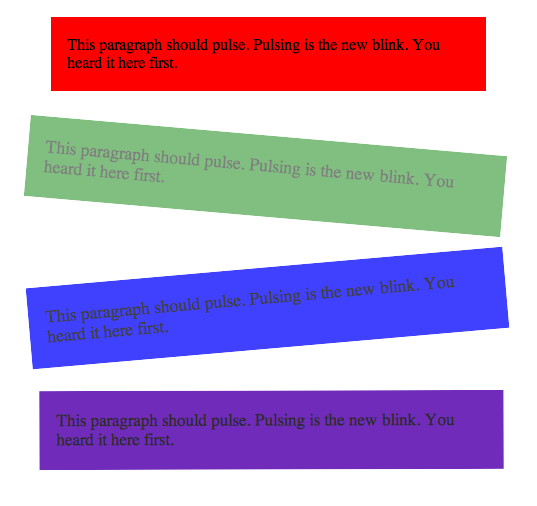
Something about a picture being worth a thousand words… Actually, it’s an animation, so you’d need a browser that supports it, and the iPhone’s Safari browser is the only ‘released’ browser that supports it at this time.

Here’s the video… What I didn’t realize before, is that it appears he was pied by three different people…
[youtube]http://www.youtube.com/watch?v=80klbFewuZM[/youtube]

I knew most of this… but alas, not all of it… BTW, here’s a relevant ThinkGeek.com present a friend gave me:
I found this interesting article on How To Change An Early WPMU Database from latin1 to utf8 Encoding, which has a bunch of useful links related to character encoding problems, WordPress (WPMU), and MySQL & PHP.
From the article in question:
So I have an announcement to make: if you are a programmer working in 2003 and you don’t know the basics of characters, character sets, encodings, and Unicode, and I catch you, I’m going to punish you by making you peel onions for 6 months in a submarine. I swear I will.
IT’S NOT THAT HARD.
In this article I’ll fill you in on exactly what every working programmer should know. All that stuff about “plain text = ascii = characters are 8 bits” is not only wrong, it’s hopelessly wrong, and if you’re still programming that way, you’re not much better than a medical doctor who doesn’t believe in germs. Please do not write another line of code until you finish reading this article.
And then there’s this juicy tidbit:
For a while it seemed like that might be good enough, but programmers were complaining. “Look at all those zeros!” they said, since they were Americans and they were looking at English text which rarely used code points above U+00FF. Also they were liberal hippies in California who wanted to conserve (sneer). If they were Texans they wouldn’t have minded guzzling twice the number of bytes. But those Californian wimps couldn’t bear the idea of doubling the amount of storage it took for strings, and anyway, there were already all these doggone documents out there using various ANSI and DBCS character sets and who’s going to convert them all? Moi? For this reason alone most people decided to ignore Unicode for several years and in the meantime things got worse.
And some more:
Turning MySQL data in latin1 to utf-8 utf8
I’ve just finished one of the most difficult and tedious problems I’ve ever solved, so I have to share the solution here in a little tutorial of how I fixed this, even though I’m sure there are better ways, this is what worked for me.
THE PROBLEM – PART 1:
My old CD Baby MySQL database from 1998 was filled with foreign characters and was in MySQL’s default (latin1) encoding.
For years, customers and clients had been using our web interface to give us their names, addresses, song titles, bio, and many things in all kinds of alphabets.
I wanted everything to be in UTF-8. (The database, the website, the MySQL client, everything.)QUICK DEFINITION : “FOREIGN CHARACTERS”
When I say “foreign characters” I mean not just Greek, Icelandic, Japanese, Chinese, Korean, and others shown at Omniglot, but also the curly-quotes, ellipsis, em-dash, and things described at alistapart.
And from AlexKing.org comes Fixing a MySQL Character Encoding Mismatch
We ran into an interesting MySQL character encoding issue at Crowd Favorite today while working to upgrade and launch a new client site.
Here is what we were trying to do: copy the production database to the staging database so we could properly configure and test everything before pushing the new site live. Pretty simple right? It was, until we noticed a bunch of weird character encoding issues on the staging site.
It turned out that while the database tables were set to a Latin-1 (latin1), the content that populated those tables was encoded as UTF-8 (utf8).